Coursya learning path 40 · Beginner
The clarity press
Write the instruction someone can actually finish.
Produce and test a concise task guide with prerequisites, ordered steps, expected results and a troubleshooting section.
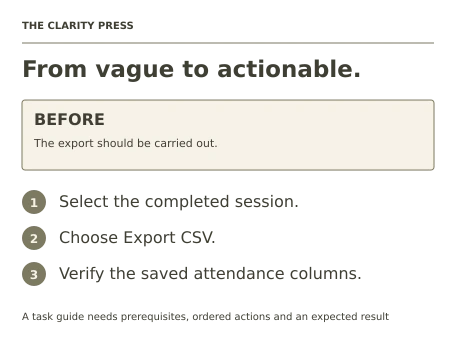
Video duration uses the selected lessons only. Reading and practice times are planning estimates; repeat difficult work as needed.
Table of Contents
A clear starting point
Who this is for
Comfort writing short English sentences and using a text editor. No programming or paid course account.
Your practical result
Produce and test a concise task guide with prerequisites, ordered steps, expected results and a troubleshooting section.
This is a task-documentation project, not the instructor-led portion of Google training, a writing credential or a complete documentation system.
Access and cost
The public pre-class material is free. No registration, instructor-led session or certificate is required for this path.
The project pack contains an original workbook, case inputs, an evidence log and reference notes. Some technical paths include starter code and a runnable reference. Read the pack README before starting.
Three-minute readiness check
Answer first, then open each explanation. A missed answer identifies what to revisit; it does not stop you from starting.
Should a procedure hide prerequisites in its last step?
No. State them before the task.
Is export the same as delete?
No. Use precise action words.
How do you know a guide works?
Test it against the stated task and record where a reader gets stuck.
The case you will work on
The fictional Birch Learning Club needs a guide for exporting a completed attendance file. The process uses a local practice application described in the workbook: open the attendance table, choose the completed session, select Export CSV and save the file. The guide must distinguish previewing attendance from exporting it.
| Reader need | Guide requirement |
|---|---|
| Find the right session | State the session-selection step |
| Know what was exported | Name the file and expected columns |
| Handle an empty session | Explain the no-records outcome |
| Protect source data | Export a copy without editing attendance |
These are supplied synthetic inputs, not observations from a real organization. Label assumptions and any additional data you create.
Keep an evidence trail
Save each stage output in the project folder. In evidence_log.csv, record the decision, the artifact or test that supports it, what failed, and the revision you made.
Your route from learning to evidence
- Stage 1Define the audience and taskAn audience and task brief.55 minutes of original practice
- Stage 2Draft action-led stepsA first procedural draft.65 minutes of original practice
- Stage 3Make terms and examples consistentA revised guide and terminology sheet.55 minutes of original practice
- Stage 4Add recoverable troubleshootingA three-case troubleshooting section.60 minutes of original practice
- Stage 5Test the guide against the taskA tested guide with a revision log.70 minutes of original practice
- Final projectMake the evidence reviewableConnect the five stage outputs and test a change.180 minutes estimated
Progress stays in this browser. Tick a stage only after its evidence check passes. This is a personal checklist, not a certificate.
Why these source courses
The path uses selected material from courses already published on Coursya. The original exercises below connect that material to one practical outcome. Follow only the listed assignments; completing the full source courses is optional.
Google Technical Writing One: Free Self-Paced Lessons
Google Technical Writing One supplies public pre-class instruction. The attendance-export specification, writing tasks and review checklist are original Coursya exercises.
Access: Free public pre-class lessons and text exercises, usable independently with a browser and free editor. An internet connection is required; videos are optional.
Certificate: Google provides no completion certificate for these technical writing courses.
Learn it, apply it, check it
Work in order. Every stage produces something the next stage uses. Revisit the repair instruction when a check fails.
Define the audience and task
Comfort writing short English sentences and using a text editor. No programming or paid course account.
The idea to use
A task guide serves a reader with a goal and a starting state. Identify what they already know, what files or access they need and what success looks like. The assigned public pre-class reading introduces clear technical writing; the following original exercises apply those ideas to one small procedure. Avoid mixing a tutorial, reference and troubleshooting article without a clear purpose.
Read with a purpose
Technical Writing One: public pre-class material
120 minutes · Provider planning estimate. Open the provider resource.
Your 55-minute lab
Write a reader profile, scope statement and prerequisites for exporting attendance.
Save: An audience and task brief..
Evidence check
The brief names the starting state, intended reader and exported-file outcome.
If it fails: Replace a broad topic such as attendance management with the specific task.
Draft action-led steps
Bring your previous output: An audience and task brief.
The idea to use
Each step should tell the reader what to do and where to do it. Use consistent interface names from the practice specification, and keep the sequence in the order the reader encounters it. Put a necessary condition before the action it changes. Short sentences help, but splitting every phrase into a separate numbered step can obscure the actual task.
Original practice stage. No additional video or reading assignment is required.
Your 65-minute lab
Draft five to seven numbered steps from the supplied process. Add an expected result after export.
Save: A first procedural draft..
Evidence check
A reader can identify the action, object and next state in each step.
If it fails: Replace passive wording such as the file should be saved with an explicit Save action.
Make terms and examples consistent
Bring your previous output: A first procedural draft.
The idea to use
Choose one name for each concept and use it consistently. Session, event and class might sound interchangeable but can confuse a reader if the interface uses only Session. A small example file name and column list make the output concrete. Explain any abbreviation at first use when the audience may not know it.
Original practice stage. No additional video or reading assignment is required.
Your 55-minute lab
Create a five-term mini glossary and revise the draft for consistent labels. Add a synthetic example file name and columns.
Save: A revised guide and terminology sheet..
Evidence check
The guide uses the same session and export labels throughout and identifies the expected CSV columns.
If it fails: Do not change interface labels merely to avoid repeating a word.
Add recoverable troubleshooting
Bring your previous output: A revised guide and terminology sheet.
The idea to use
Troubleshooting connects a symptom to a useful next action. For an empty session, explain how to verify the selected session and whether attendance exists. Do not ask the reader to repeat a destructive or unrelated operation. Keep the common failure cases close to the procedure and state when the reader should stop and ask the responsible owner.
Original practice stage. No additional video or reading assignment is required.
Your 60-minute lab
Write entries for an empty export, wrong session and missing save permission. Include expected recovery and escalation.
Save: A three-case troubleshooting section..
Evidence check
Each case has a symptom, a check and a bounded next action.
If it fails: Avoid the unhelpful instruction try again without explaining what should change.
Test the guide against the task
Bring your previous output: A three-case troubleshooting section.
The idea to use
A documentation test observes whether the stated steps lead from the starting state to the promised result. Use the supplied process simulator or a clearly labeled walkthrough; do not invent participant feedback. Record where information is missing, revise the guide and repeat the affected steps. A style checklist complements task testing but cannot replace it.
Original practice stage. No additional video or reading assignment is required.
Your 70-minute lab
Run the guide through the provided paper walkthrough, record three checks and revise at least one ambiguity.
Save: A tested guide with a revision log..
Evidence check
The final guide produces the expected file description and distinguishes untested real-application behavior.
If it fails: Do not claim a user study if you performed only a solo walkthrough.
A worked reference to compare
A precise step says: Select the completed session, then choose Export CSV. Its expected result names the downloaded attendance copy and its columns. If there are no records, the guide asks the reader to verify the session instead of inventing data or changing attendance.
Compare your reasoning as well as the result. If your answer differs, state the assumption or input that explains the difference. Reference notes are for checking after an attempt; copying them is not evidence of independent work.
Your final project
Your brief
Deliver the task brief, final guide, glossary, troubleshooting entries and test log. Add a short quick-start version that preserves the prerequisites and expected result without losing necessary actions.
Time box: 3h 00m estimated. Extend it if a gate needs repair.
Hand in these artifacts
- An audience and task brief.
- A first procedural draft.
- A revised guide and terminology sheet.
- A three-case troubleshooting section.
- A tested guide with a revision log.
- A short README: outcome, how to inspect or run the work, assumptions and limitations.
- A before-and-after change test and the completed evidence log.
Run a final review
- Use the supplied reference to reconcile the baseline result.
- Choose one relevant input or constraint to change. Write your expected effect before testing it.
- Run the calculation, walkthrough or test again and save the actual result.
- Ask a peer to inspect the evidence, or perform a separate self-review. Label which review you used.
- Score the work using the rubric and repair every critical failure.
Review rubric · 100 points
| Criterion | Points | Evidence to inspect |
|---|---|---|
| Practical outcome and case reasoning | 25 | Produce and test a concise task guide with prerequisites, ordered steps, expected results and a troubleshooting section. |
| Five stage checks | 30 | Award 6 points for each stage only when its stated gate is demonstrably met. |
| Traceable evidence | 20 | Artifacts, inputs and calculations or tests are reproducible; synthetic and simulated evidence is labelled. |
| Revision after a changed condition | 15 | Change one input or constraint, predict the effect, test it and record the result. |
| Handoff quality | 10 | A reviewer can find the files, follow the instructions and understand the remaining limitations. |
Completion target: at least 80/100, all five stage gates passed, and every critical issue below corrected. This is a learning benchmark, not an accredited qualification.
Critical issue: The final procedure has an unambiguous starting state, action sequence and verifiable result, with no fabricated test evidence.
Before you go further
What will I be able to produce?
Produce and test a concise task guide with prerequisites, ordered steps, expected results and a troubleshooting section.
Is the whole path free?
The public pre-class material is free. No registration, instructor-led session or certificate is required for this path.
Do I need to finish every source course?
No. Follow the selected assignments at each stage. Source courses provide context, while the original case, labs and final review build the practical result. Extra study is optional.
What counts as completion?
Complete all five stage checks, earn at least 80/100 on the final rubric and correct every critical issue. This is a task-documentation project, not the instructor-led portion of Google training, a writing credential or a complete documentation system.
Questions & discussion
Share a useful question or correction. Comments appear after moderation. Please avoid personal or sensitive information.