Coursya learning path 33 · Beginner
The packet route
Find the failing layer before changing settings.
Produce a reproducible network incident report that separates local connectivity, name resolution, transport and application evidence.
Video duration uses the selected lessons only. Reading and practice times are planning estimates; repeat difficult work as needed.
Table of Contents
A clear starting point
Who this is for
Basic computer use and access to your own computer or an authorized practice environment.
Your practical result
Produce a reproducible network incident report that separates local connectivity, name resolution, transport and application evidence.
This covers introductory diagnosis on authorized systems, not network engineering certification, packet forensics or penetration testing.
Access and cost
Assigned public videos can be watched free. Complete the original case in a text editor, on paper or in a spreadsheet you already have. No paid course, exam or provider certificate is included.
The project pack contains an original workbook, case inputs, an evidence log and reference notes. Some technical paths include starter code and a runnable reference. Read the pack README before starting.
Three-minute readiness check
Answer first, then open each explanation. A missed answer identifies what to revisit; it does not stop you from starting.
Does ping failure prove a host is down?
No. ICMP may be filtered.
Can a DNS error be fixed by reinstalling an application automatically?
That action is not justified by the evidence.
What should precede a change?
A hypothesis, a safe test and a recorded baseline.
The case you will work on
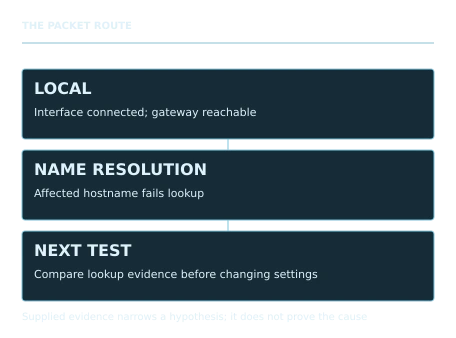
The fictional Elm Office reports that a learning website is unreachable. Supplied observations: local network interface is connected; the gateway is reachable; another HTTPS site opens; the affected hostname fails to resolve; a colleague using another resolver can resolve it. These observations narrow hypotheses but do not prove a root cause.
| Check | Supplied observation |
|---|---|
| Local interface | Connected |
| Gateway | Reachable |
| Other HTTPS website | Loads |
| Affected hostname lookup | Fails |
| Colleague lookup | Succeeds |
These are supplied synthetic inputs, not observations from a real organization. Label assumptions and any additional data you create.
Keep an evidence trail
Save each stage output in the project folder. In evidence_log.csv, record the decision, the artifact or test that supports it, what failed, and the revision you made.
Your route from learning to evidence
- Stage 1Map the connection pathA dependency map and incident scope.65 minutes of original practice
- Stage 2Inspect local and routing evidenceA timestamped local-connectivity evidence sheet.70 minutes of original practice
- Stage 3Test the naming hypothesisA DNS hypothesis and evidence comparison.70 minutes of original practice
- Stage 4Separate transport from applicationA symptom-to-layer triage table.60 minutes of original practice
- Stage 5Write the escalation and verificationA reproducible troubleshooting and escalation report.75 minutes of original practice
- Final projectMake the evidence reviewableConnect the five stage outputs and test a change.180 minutes estimated
Progress stays in this browser. Tick a stage only after its evidence check passes. This is a personal checklist, not a certificate.
Why these source courses
The path uses selected material from courses already published on Coursya. The original exercises below connect that material to one practical outcome. Follow only the listed assignments; completing the full source courses is optional.
Free Computer Networking Course by Google
Google public networking lessons cover layers, DNS, services and troubleshooting in a coherent sequence.
Access: Free Video
Certificate: Free video viewing; a Google certificate is not included
Learn it, apply it, check it
Work in order. Every stage produces something the next stage uses. Revisit the repair instruction when a check fails.
Map the connection path
Basic computer use and access to your own computer or an authorized practice environment.
The idea to use
A request passes through local connectivity, addressing, routing, name resolution and the application protocol. Draw these dependencies before troubleshooting. Different tools observe different parts of the path, and a successful check at one layer does not prove every later layer works. Start with scope: one device, one site, one time period or a broader outage.
Watch the selected lessons
Selected video time: 41m. Open this course on Coursya.
Your 65-minute lab
Draw the path from the learner computer to a website and write five scoping questions.
Save: A dependency map and incident scope..
Evidence check
The map separates DNS from the eventual HTTPS connection.
If it fails: Do not treat the internet as a single binary working-or-broken component.
Inspect local and routing evidence
Bring your previous output: A dependency map and incident scope.
The idea to use
Read the local interface and route information without changing settings. Record the active interface, gateway and whether a route exists. A gateway response supports local reachability but says little about a remote application. Use your own computer and approved destinations; the learning task requires observation, not broad network scanning or configuration changes.
Watch the selected lessons
Selected video time: 1h 02m. Open this course on Coursya.
Your 70-minute lab
Record interface and default-route information using the supplied operating-system command guide. Interpret the given gateway result.
Save: A timestamped local-connectivity evidence sheet..
Evidence check
Every observation names the tool and what it does and does not establish.
If it fails: Avoid copying full private network details into a public portfolio; use the synthetic case there.
Test the naming hypothesis
Bring your previous output: A timestamped local-connectivity evidence sheet.
The idea to use
A hostname must resolve to an address before many application requests can proceed. A failed lookup can involve the local resolver path, a cached result or the authoritative data; it does not identify the exact cause by itself. Compare a known-good hostname and the affected hostname, record the resolver used and preserve the error text.
Watch the selected lessons
Selected video time: 36m. Open this course on Coursya.
Your 70-minute lab
Use the supplied synthetic lookup transcript to compare the two hostnames. Write the next least-disruptive test and its possible interpretations.
Save: A DNS hypothesis and evidence comparison..
Evidence check
The report narrows the issue to name resolution without claiming a proven resolver defect.
If it fails: Do not replace a hypothesis with a confident root-cause label before the discriminating test.
Separate transport from application
Bring your previous output: A DNS hypothesis and evidence comparison.
The idea to use
Once a name resolves, a connection can still fail at transport, TLS or the application. HTTP response codes are application evidence; a DNS success is not. A certificate warning is a different symptom from a timeout. Capture the exact observed result rather than collapsing every failure into network down, and never bypass a security warning as a troubleshooting shortcut.
Watch the selected lessons
- 3. Exploring the Transport and Application Layers41:34
- 5. Networking Services: Best Practices and Technologies30:52
Selected video time: 1h 12m. Open this course on Coursya.
Your 60-minute lab
Classify four supplied outcomes: lookup failure, connection timeout, certificate error and HTTP 404. Identify the next responsible team for each.
Save: A symptom-to-layer triage table..
Evidence check
HTTP 404 is distinguished from failure to reach the server at all.
If it fails: If all outcomes receive the same fix, return to the layer-specific evidence.
Write the escalation and verification
Bring your previous output: A symptom-to-layer triage table.
The idea to use
A useful incident report separates facts, hypotheses, attempted changes and results. Include a minimal reproduction, timestamps, scope and an explicit unresolved question. After an approved fix, rerun the same checks and verify the user task. One successful ping is not enough to close an incident about loading a learning page.
Watch the selected lessons
Selected video time: 49m. Open this course on Coursya.
Your 75-minute lab
Write the incident report and a closure checklist for the Elm case. Keep the root cause unresolved if the supplied evidence is insufficient.
Save: A reproducible troubleshooting and escalation report..
Evidence check
The report includes before/after checks and verifies the actual HTTPS page task.
If it fails: Do not invent a successful fix or a packet capture that was not performed.
A worked reference to compare
The supplied evidence makes a broad local-network outage less likely and points toward a name-resolution problem. It does not prove which resolver component is at fault. A good escalation preserves the failed lookup and proposes a discriminating test before changing settings.
Compare your reasoning as well as the result. If your answer differs, state the assumption or input that explains the difference. Reference notes are for checking after an attempt; copying them is not evidence of independent work.
Your final project
Your brief
Submit the path map, evidence sheet, hypothesis log, symptom table and incident report. Add a scenario where DNS succeeds but HTTPS times out and explain how the next test changes.
Time box: 3h 00m estimated. Extend it if a gate needs repair.
Hand in these artifacts
- A dependency map and incident scope.
- A timestamped local-connectivity evidence sheet.
- A DNS hypothesis and evidence comparison.
- A symptom-to-layer triage table.
- A reproducible troubleshooting and escalation report.
- A short README: outcome, how to inspect or run the work, assumptions and limitations.
- A before-and-after change test and the completed evidence log.
Run a final review
- Use the supplied reference to reconcile the baseline result.
- Choose one relevant input or constraint to change. Write your expected effect before testing it.
- Run the calculation, walkthrough or test again and save the actual result.
- Ask a peer to inspect the evidence, or perform a separate self-review. Label which review you used.
- Score the work using the rubric and repair every critical failure.
Review rubric · 100 points
| Criterion | Points | Evidence to inspect |
|---|---|---|
| Practical outcome and case reasoning | 25 | Produce a reproducible network incident report that separates local connectivity, name resolution, transport and application evidence. |
| Five stage checks | 30 | Award 6 points for each stage only when its stated gate is demonstrably met. |
| Traceable evidence | 20 | Artifacts, inputs and calculations or tests are reproducible; synthetic and simulated evidence is labelled. |
| Revision after a changed condition | 15 | Change one input or constraint, predict the effect, test it and record the result. |
| Handoff quality | 10 | A reviewer can find the files, follow the instructions and understand the remaining limitations. |
Completion target: at least 80/100, all five stage gates passed, and every critical issue below corrected. This is a learning benchmark, not an accredited qualification.
Critical issue: Observed evidence is separated from hypotheses and no unperformed test or fix is reported as successful.
Before you go further
What will I be able to produce?
Produce a reproducible network incident report that separates local connectivity, name resolution, transport and application evidence.
Is the whole path free?
Assigned public videos can be watched free. Complete the original case in a text editor, on paper or in a spreadsheet you already have. No paid course, exam or provider certificate is included.
Do I need to finish every source course?
No. Follow the selected assignments at each stage. Source courses provide context, while the original case, labs and final review build the practical result. Extra study is optional.
What counts as completion?
Complete all five stage checks, earn at least 80/100 on the final rubric and correct every critical issue. This covers introductory diagnosis on authorized systems, not network engineering certification, packet forensics or penetration testing.
Questions & discussion
Share a useful question or correction. Comments appear after moderation. Please avoid personal or sensitive information.