Career studio / Professional Writing
Build evidence for the Technical Writer role
A local CSV-import tool has confusing instructions and vague errors. Create documentation that lets a first-time user complete an import and recover from a malformed file.
Your outcome: Quickstart, task guide, troubleshooting table and documentation test record.
Table of Contents
Start with the right expectations
Who this is for
Clear written English and curiosity about how a product works.
This path develops a demonstrable work sample for the named role. It does not replace employer-specific experience, professional qualifications or supervised practice.
Plan your study time
Use a flexible six-week project schedule: one week for each of the first four stages and two weeks for the portfolio and review. Allow roughly 3–5 hours per week for the case work, in addition to course study. This is a planning suggestion, not a measured course duration or a promise of job readiness.
Read the course access notes before starting. Free viewing or reading does not automatically include certificates, graded assessments, software licences or paid cloud resources. Core case work can be documented with a free editor and spreadsheet; optional implementation tools may have additional requirements.
Your course sequence
Start in the order below. Use the course outline to select the sections relevant to the stage tasks, and complete foundation exercises before moving on. Full provider courses can be substantially longer than this project schedule. These are course resources, not a claimed count of individual lessons.
Resource 01 / Google
Google Technical Writing One: Free Self-Paced Lessons
Purpose: Build the foundations. Connect your notes to the case tasks below rather than only collecting completion marks.
- Choose words consistently: introduce unfamiliar terms and use abbreviations without leaving readers to guess.
- Make sentences clearer: recognise ambiguous pronouns, use active voice and reduce unnecessary wording.
- Create useful lists: choose numbered steps or bullets to suit the information you are explaining.
Access: Free public pre-class lessons and text exercises, usable independently with a browser and free editor. An internet connection is required; videos are optional.
Certificate: Google provides no completion certificate for these technical writing courses.
Resource 02 / Google
Google Tech Writing for Accessibility: Free Self-Study Course
Purpose: Develop the role-specific method. Connect your notes to the case tasks below rather than only collecting completion marks.
- Recognise how permanent, temporary and situational barriers affect the way people use documentation.
- Write concise alternative text that explains an image’s purpose in its surrounding context.
- Measure foreground and background contrast instead of relying on how colours look to you.
Access: Free public self-study lessons and exercises using a browser, editor and contrast checker. No account or paid tools required.
Certificate: No completion certificate provided.
Resource 03 / Google
Google Writing Helpful Error Messages: Free Technical Writing Course
Purpose: Strengthen practical application. Connect your notes to the case tasks below rather than only collecting completion marks.
- Explain the cause: replace vague failure messages with information that helps someone understand the problem.
- Describe useful constraints: make limits, permissions and other requirements specific enough to act on.
- Offer a route forward: connect an error with an appropriate next step or a relevant explanation.
Access: Free public self-study lessons, examples and exercises. No account or paid software required; ordinary text editor for optional rewrites.
Certificate: Google explicitly does not provide completion certificates.
Learn, make, check
Keep a decision log as you work. For each stage, capture the assumption, your work product, a check and the change you made after that check. The acceptance criterion is the stopping condition for the stage.
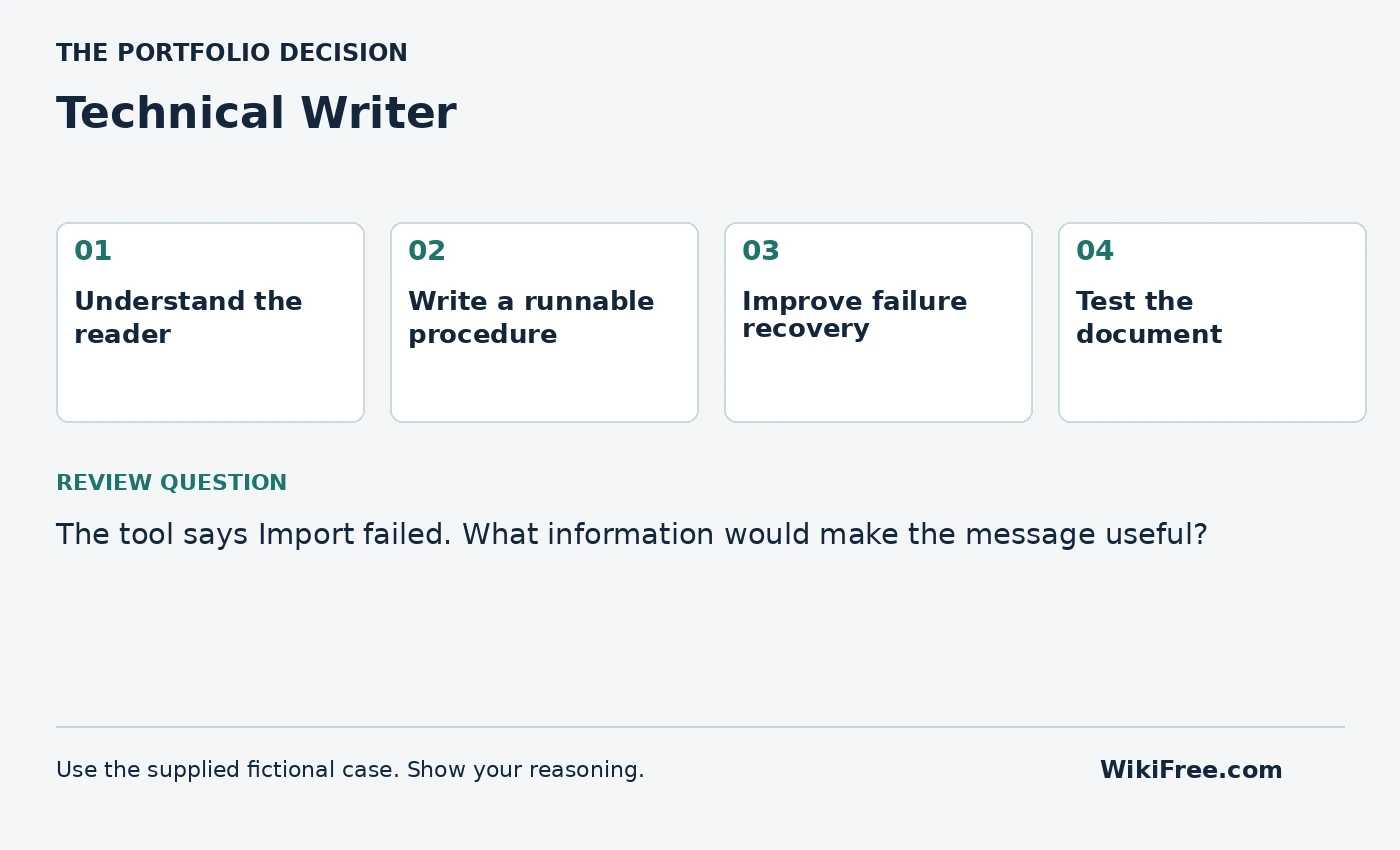
Stage 1 / suggested project week 1
Understand the reader
Understand: Documentation should match the reader’s task and prior knowledge.
Make: Define one primary reader, their goal and the prerequisites they actually need.
Check before moving on: Do not assume developer knowledge for an end-user guide.
Study companion: Google Technical Writing One: Free Self-Paced Lessons. Use its relevant lessons and examples; the independent Coursya task is not a provider assessment.
Save as evidence: a dated work product and a short note explaining one choice, one alternative and one remaining uncertainty.
Stage 2 / suggested project week 2
Write a runnable procedure
Understand: A procedure needs ordered actions and observable results.
Make: Draft a quickstart with sample input, commands or UI actions and expected output.
Check before moving on: Each step has one clear action and avoids unexplained jargon.
Study companion: Google Tech Writing for Accessibility: Free Self-Study Course. Use its relevant lessons and examples; the independent Coursya task is not a provider assessment.
Save as evidence: a dated work product and a short note explaining one choice, one alternative and one remaining uncertainty.
Stage 3 / suggested project week 3
Improve failure recovery
Understand: An error message should explain what happened and what to do next.
Make: Rewrite three vague errors and add a troubleshooting table.
Check before moving on: Do not expose secrets or internal stack traces as user guidance.
Study companion: Google Writing Helpful Error Messages: Free Technical Writing Course. Use its relevant lessons and examples; the independent Coursya task is not a provider assessment.
Save as evidence: a dated work product and a short note explaining one choice, one alternative and one remaining uncertainty.
Stage 4 / suggested project week 4
Test the document
Understand: Documentation testing checks whether a reader can act on the text.
Make: Run a cold-read walkthrough yourself or with a consenting reviewer and record actual observations.
Check before moving on: Do not invent user-test quotes or claim an unperformed test.
Study companion: Google Writing Helpful Error Messages: Free Technical Writing Course. Use its relevant lessons and examples; the independent Coursya task is not a provider assessment.
Save as evidence: a dated work product and a short note explaining one choice, one alternative and one remaining uncertainty.
Stage 5 / suggested project weeks 5–6
Present your portfolio
Assemble the four work products into Quickstart, task guide, troubleshooting table and documentation test record. Write a README explaining the problem, your assumptions, the decisions you made, tests actually performed and what remains incomplete.
Give a five-minute walkthrough: one minute for the problem, two for the work and evidence, one for trade-offs and one for the next improvement. If you have not implemented a proposed system, label it a design or prototype rather than a deployed solution.
Acceptance: a reviewer can locate each work product, reproduce the key reasoning and identify the limits without a private explanation from you.
The portfolio brief
A local CSV-import tool has confusing instructions and vague errors. Create documentation that lets a first-time user complete an import and recover from a malformed file.
Deliver: Quickstart, task guide, troubleshooting table and documentation test record.
| error code | condition | recovery |
|---|---|---|
| E 01 | Missing course_id column | Add the required column header |
| E 02 | Invalid date format | Use YYYY-MM-DD |
| E 03 | Empty file | Provide at least one data row |
Use these small inputs to make the reasoning visible. They are not a representative dataset, a real client engagement or evidence of production performance. Where the brief requires additional sample records, create them yourself, label them synthetic and explain why you added them.
The ZIP includes the case CSV, four stage worksheets, course sequence, decision log, test log, portfolio README template, review rubric and reference reasoning. It is a starter kit for your work, not a completed application, professional report or proprietary project file.
Check your reasoning
The tool says Import failed. What information would make the message useful?
Write your answer and assumptions before opening the reference.
Read the reference reasoning
The affected file or field, a safe explanation of the problem and a concrete recovery action. For example, identify a missing required column without exposing sensitive file content.
Portfolio review rubric
| Criterion | Points | Evidence required |
|---|---|---|
| Problem and scope | 4 | A clear user, need, boundary and assumptions |
| Role-specific work | 8 | 2 points for each of the four stage acceptance checks |
| Reasoning and validation | 4 | Independent checks, actual results and uncertainty |
| Communication and reproducibility | 4 | A usable README, source links and reviewable work products |
Aim for at least 16/20 as a self-review target, with no missing stage acceptance check. This is a Coursya practice rubric, not an industry credential or a hiring assessment.
Interview practice
Show a change you made because the original instruction was ambiguous.
Answer using the case: context, your action, evidence and limitation. Describe this honestly as a self-directed project. Do not present fictional organizations, invented interviews or practice results as paid work experience.
Your progress
Use this checklist as a personal study aid. Progress is stored in this browser when local storage is available; it is not an account record or a certificate.
0 of 5 milestones complete
The lessons and projects remain readable without JavaScript. Automatic progress saving requires JavaScript.
Questions before you start
Will this path qualify me for a job?
It helps you study relevant foundations and produce a work sample. Employers may require additional skills, qualifications and experience. Review actual role requirements before applying; no job or certification is guaranteed.
Are all tools and certificates free?
The linked learning routes were selected for free viewing or reading. Follow the separate access and certificate notes on each course. Paid tools and cloud deployment are optional; document a local design when implementation resources are unavailable.
Can I follow this on a phone?
You can read the path and many learning resources on a phone. Coding, detailed spreadsheet work, design tools and mobile-app development are easier or require a suitable computer. The page is designed to reflow; that is not a claim that every physical device has been tested.
Questions & discussion
Share a useful question or correction. Comments appear after moderation. Please avoid personal or sensitive information.